









Before a trip, the phone ends up carrying most of the load: maps, tickets, translation, photos. Xiaomi listed a few HyperOS features that help on the road. Some are useful, a couple depend on your model, and one has a limit most people won’t expect.

Do this before you leave
A few days out, delete duplicate photos and apps you never open, then back up photos and contacts. Install updates on home Wi-Fi so you don’t burn roaming data on them. Download offline maps and your translation language pack. And wipe the camera lenses. It sounds trivial, but a smudged lens ruins more travel photos than any setting does.
Camera and Gallery
Try the photo and video modes at home, not at the airport. The HyperOS 3 Gallery has AI Erase Pro, which removes strangers or objects from a shot, and AI search that finds a photo by description. It is handy for editing on the phone without another app.
Sharing files
Xiaomi Share moves files between Xiaomi devices. Quick Share is Android’s nearby sharing and works with a lot of phones. On selected HyperOS 3 devices, Touch to Share (called Tap to Share in some regions) sends photos, files and Wi-Fi passwords when you tap two devices together.
AI translation and search
AI Translate handles face-to-face conversations and works offline once the language pack is downloaded. That matters when you switch off roaming or the signal is poor. Circle to Search is Google’s feature, built into Xiaomi phones: circle a landmark or a dish on screen and you get results without leaving the app.
Tracking luggage with Xiaomi Tag
Xiaomi Tag is a small Bluetooth tracker for a suitcase, bag or keys. It works with Google Find Hub on Android and Apple Find My on iPhone, takes a replaceable CR2032 battery rated at over a year, weighs about 10 g and is IP67 rated. You need Android 9 or later, or iOS 14.5 or later.
The catch is that it pairs with only one network at a time. If you start on Find Hub and later switch to an iPhone, you have to remove the Tag and set it up again. Left-behind alerts and NFC Lost mode also work only on Apple Find My, so Android users get a smaller feature set.
Battery settings
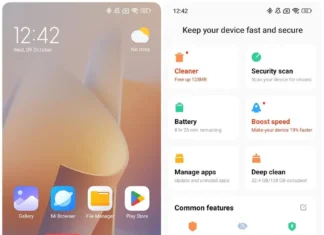
Maps, photos and transport apps drain a phone quickly. In HyperOS power management you can cap charging at 80% with Battery Protection (options vary by model), let Smart Charging learn your routine, and see which apps use the most power. Battery Saver and Ultra Battery Saver are there for the long days. Some models also have a cold resistance mode, which only matters if you are going somewhere freezing. Carry a power bank regardless.
Other Xiaomi devices that help on a trip
A Xiaomi Smart Band or Watch shows notifications and alarms without taking the phone out. Xiaomi Buds are good on flights and trains. A Xiaomi Pad gives you a bigger screen for maps and films, and a Xiaomi power bank covers the end of a long day. At home, the Xiaomi Home app lets you check cameras or run the robot vacuum while you are away.
Feature names and availability change by model, region and software version, so check Settings before you go.