










To Unlock Xiaomi Phone Bootloader, There are two parts to this: bind your Xiaomi account on the phone, then run Mi Unlock from a PC. Before anything else, know that unlocking wipes all your data and voids your warranty.
Before you start
Your phone has to boot normally. If it’s bricked, soft-bricked, or in a bootloop, take it to a service center, because the phone won’t let you bind an account in that state. You’ll also need:
- Mi USB drivers and platform tools on your PC
- The official MIUI ROM and a Xiaomi account
- A SIM card with mobile data that actually works
Some things people tend to learn the hard way:
- Back up first. The unlock erases everything.
- Once your account is bound, don’t factory reset or sign out. Doing either restarts the 168-hour timer.
- One account can unlock one phone per 30 days, and four phones per year.
- Use an Intel-based PC. If Mi Unlock can’t find your phone or shows an unknown error, borrow another 64-bit PC.
- You don’t need to fill in an application form.
- Android One phones don’t need any of this.
Step to Unlock Xiaomi Phone Bootloader
Step 1: On the phone
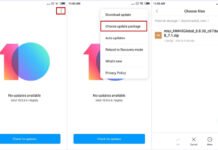
- Open Settings » About phone and keep tapping MIUI version until “You are now a developer!” shows up.
- Go to Settings » Additional settings » Developer options and turn on OEM unlocking and USB debugging.
- Tap Mi Unlock status » Agree » Add account and device. Keep mobile data on.
- Wait for “Added successfully. Mi account is associated with this device now.”
- Power the phone off, then hold Volume Down + Power to get into Fastboot mode.
- Connect it to your PC.
Step 2: On the PC
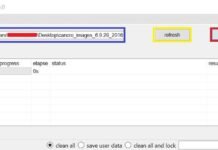
- Download Mi Unlock, open it, and sign in with the same Xiaomi account.
- With the phone in Fastboot mode and plugged in, you should see Phone connected. If it says Not connected to the phone, reinstall the Mi USB driver and retry.
- Click Unlock » Unlock anyway.
- Your first try will fail with “Couldn’t unlock. Please unlock 168 hours later.” That’s the waiting period, and it can be shorter for some people. Keep using the phone as usual until it’s done.
- When the timer runs out, click Unlock » Unlock anyway again.
- The phone reboots on its own. If it doesn’t, click Reboot phone.
If account binding fails
You might see “Couldn’t verify. Try adding your account and device again,” “Couldn’t verify, wait a minute or two and try again,” or “Couldn’t add. Error code: 20091.” Try this:
- Check that mobile data is on and working.
- Go to Settings » Xiaomi account, tap Sign out, and enter your password.
- Sign back in.
- Open Mi Unlock status and add your account and device again.
You can manage your account at account.xiaomi.com.
FAQ
Before you commit to Unlock Xiaomi Phone Bootloader
This guide doesn’t cover everything unlocking can change on your phone. If ROM flashing and custom ROMs are new to you, I’d leave the bootloader alone. A bad flash can brick the device or take your data with it.