











Local Update lets you flash a new ROM or Install Xiaomi Stable ROM without unlocking anything. It works for Global Stable to Stable, Beta to Beta, and Stable to Beta or back.
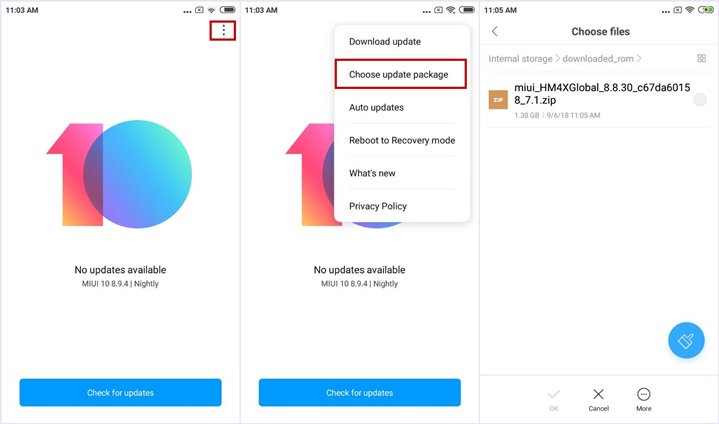
Steps to Install Xiaomi Stable ROM using Local Update
- Grab the latest ROM from the Xiaomi download page. If you already have it, skip ahead.
- Plug the phone into your Windows PC and copy the ROM into the
downloaded_romfolder in internal storage. - On the phone: Settings > About phone > System update. Tap the three dots at the top right, hit “Choose update package,” and select the file.
- It updates and reboots on its own.
If it hangs on the reboot screen for a long time, boot into Recovery Mode (power off, then hold Volume Up + Power) and wipe all data. Yes, that deletes everything on the phone.
The Xiaomi Community app is handy for OS and product news, if you want it.